iPadOS 26.2 Fixes My Biggest Gripe With Apple’s Current iPad Software
A return to simplicity for everyday users — without abandoning the power of Windowing
For years, Apple has walked a careful line between making the iPad a casual, intuitive tablet and transforming it into a full productivity machine. With iPadOS 26, that line suddenly shifted — and not everyone was thrilled. Heavy users loved the new desktop-like freedom, but many longtime fans (myself included) felt the iPad was losing part of its original appeal.
Now, with iPadOS 26.2, Apple seems to have recognized that balance matters. And in doing so, they’ve restored the feature that most shaped how I use my iPad every day.
iPadOS 26.2 brings back the multitasking gestures people actually used
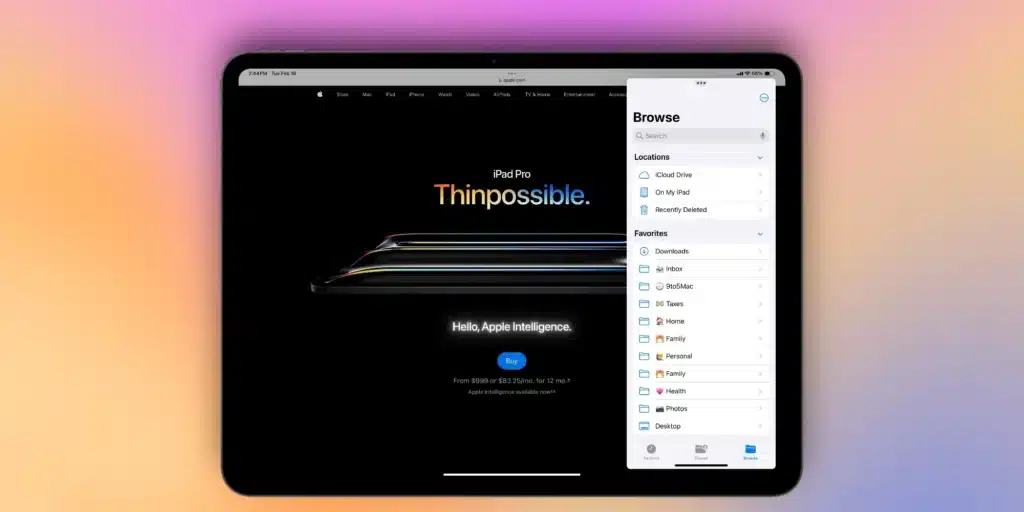
With the latest update, Apple is bringing two major multitasking upgrades back to the iPad: Split View has returned, and Slide Over has a fresh gesture. Now, once again, you can simply pull an app from the dock and watch it snap into place — no tedious manual resizing required.
“With iPadOS 26.2, Apple is bringing two major upgrades to the iPad: Split View has returned, and Slide Over has a new gesture. Now, you can just drag and drop apps from your dock, and they’ll snap into place – there’ll no longer be a need to manually resize your windows in the manner you need them.”
In other words, multitasking is once again fluid, fast, and instinctive — just like it was before the big interface shift. If you ever relied on these gestures in iPadOS 18 and earlier, you’ll instantly feel at home.
When iPadOS 26 launched, Slide Over suddenly disappeared — and it changed everything
When Apple introduced iPadOS 26 at WWDC25, the company made a bold move: it overhauled multitasking entirely. The new Windowing system brought desktop-class features like overlapping windows, traffic-light controls, and total freedom with resizing. It was a dream for power users who wanted the iPad to behave more like a MacBook.
But this also meant that the legacy multitasking system — the one casual users depended on — effectively vanished. Overnight, tools like Slide Over and Split View became harder to access, less intuitive, and buried behind menus.
For me, this dramatically changed how I used my iPad day to day. I found myself abandoning its lighter, tablet-first workflow in favor of using apps in full screen, simply because the new system felt like too much friction for quick tasks.
Slide Over had always been my go-to for grabbing Messages, checking a notification, or referencing a note. Losing the ability to summon it instantly made my iPad feel less convenient — and less like the device I’d chosen it for.
Apple tried to fix things in iPadOS 26.1 — but it wasn’t enough
In iPadOS 26.1, Apple did bring Slide Over back — sort of. But instead of a gesture, you had to click the traffic-light button to enable the mode. The spirit of Slide Over was there, but the speed was not. It felt like a compromise rather than a solution.
That’s why iPadOS 26.2 feels so significant: it’s the first version of Apple’s modern multitasking model that truly respects both kinds of iPad users.
iPadOS 26.2 restores the simplicity many users fell in love with
Now, with the 26.2 update arriving imminently, the familiar gestures to open apps in Split View and Slide Over are back — seamlessly integrated into the Windowing system. It’s not an identical recreation of the old behavior, but it’s close enough that the experience feels natural again.
For people like me who drifted away from using the iPad for work after the initial 26 release, this restoration can’t come soon enough. I’ve always valued the iPad for its effortless clarity and flexibility, and with 26.2, that balance is finally returning. You can embrace the Mac-like windowing when you want to — and ignore it when you don’t.
Community sentiment is already shifting
Top comment by lek
“im actually much warmer on the new multitasking as of 26.2. the drag from dock interaction is nice and slide over is decent! one big thing that i still dislike is the fragility of windowing for touch. the resizing handle in the bottom left corner of every window implies that you can only resize the window by dragging that handle, but you can actually do so by dragging on every corner and side, which often leads to unintentional resizing, that you then almost always have to manually fix”
Touch precision remains a challenge, but users seem genuinely happier than they were on 26.0 and 26.1.
You still can’t stack multiple Slide Over apps the way you once could, but honestly, that’s a trade-off I’m more than willing to live with.
What about you?
How do you feel about iPadOS 26 so far? Were you one of the users who missed the old Slide Over and Split View? Did you adapt to the new Windowing system, or did the change push you away from using your iPad for certain tasks?
Let us know in the comments — the iPad community is more divided (and more passionate) than ever right now.
My favorite Apple accessory recommendations
- Anker MagSafe/Qi2 Ultra-Slim Battery Pack
- Apple 40W Dynamic Power Adapter with 60W Max
- MOFT MagSafe Wallet Stand — holds up to 3 cards
- Logitech MX Master 4 Mouse for Mac
- ESR CryoBoost 3-in-1 25W MagSafe Charging Stand
- AirPods Pro 3 — now offering 2× the ANC of AirPods Pro 2